
Windows Protected Print (WPP) is a more secure print mode introduced in Windows 11 Update 24H2 (update released October 2024)
Some things to note:
o Seeking to enhance print security in Windows
o 9% of most Windows security issues are around the print service
o Uses IPP (Internet Printing Protocol) stack as foundation
o Windows 10 reaches End of Life status on October 14, 2025!
o Also, there is now Group Policy support for managing WPP!
Key change: Introduces driverless environment, no 3rd party driver support!
There is an alliance of manufacturers called Mopria that certify devices to work with Windows Protected Print. If WPP is on, ONLY Mopria-certified devices will work! Device compatibility can be checked at this website: https://mopria.org/certified-products
Currently the WPP option must be turned on manually, eventually will become the default and may become mandatory at some point. Expect this to be on by default in 2026/2027 timeframe, possibly sooner; there has not yet been a defined date for this though!
Print Support Agent (PSA): PSAs allow printer OEMs to extend existing IPP support for their specific needs. Not all printers support the same features and configuration options. PSAs allow for tailored user experiences without compromising the experience users expect.
WPP is enabled or disabled under Settings > Bluetooth & Devices > Printers & Scanners, under Printer Preferences:
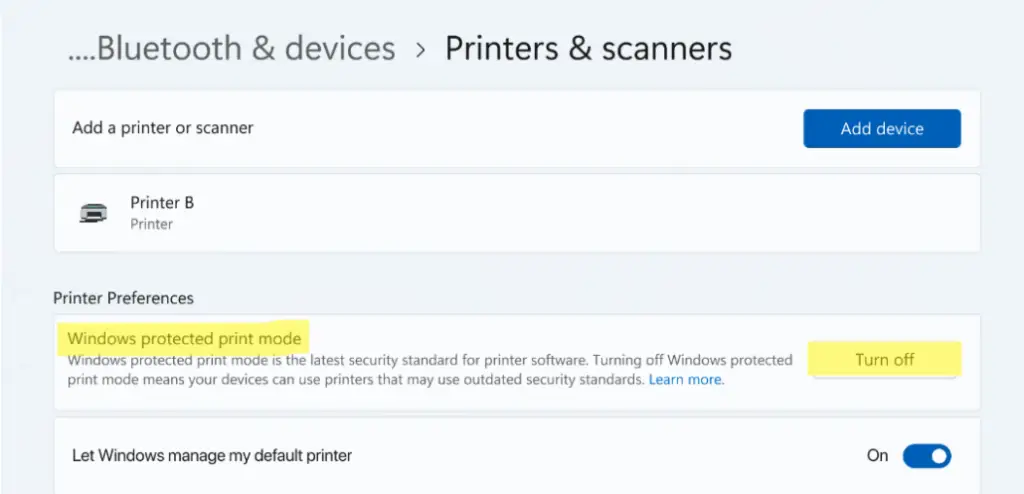
WPP ENABLED
Printers that use third–party drivers are uninstalled. The print driver is deleted from the print driver store, and it can’t be used while Windows protected print mode is active.
WPP DISABLED
When Windows protected print mode is disabled and the printer is reinstalled, the original driver is reinstalled.
If a Mopria Certified printer was originally installed using a third-party driver:
– The printer is uninstalled but can be reinstalled. When reinstalled, it uses the modern print stack instead of its third-party driver.
– If Windows protected print mode is disabled, installed printers continue to use the modern print stack unless they are removed and reinstalled with Windows protected print mode disabled.
– If a printer was originally installed with the modern print stack, enabling Windows protected print mode won’t uninstall the printer.
Printers that use third-party drivers are uninstalled. The print driver is deleted from the print driver store, and it can’t be used while Windows protected print mode is active.